Part 2: Check It
Chapter 14: Clarify
Not legal advice. Clarify points out common wording that's worth a closer look. It doesn't replace reading the document yourself, or asking a lawyer about anything that matters.
What it does. Clarify scans the text of a contract, lease or Terms of Service for wording that often deserves attention: arbitration clauses, automatic renewals, broad data-sharing, liability waivers and similar terms. It quotes each passage it finds and explains in plain words why it matters. The scan happens on your device.
When to use it.
Before you sign up for a service, a subscription or an app.
Before you sign a lease, a membership agreement or a contract.
When terms change and you want to know what to read first.
Scanning a document
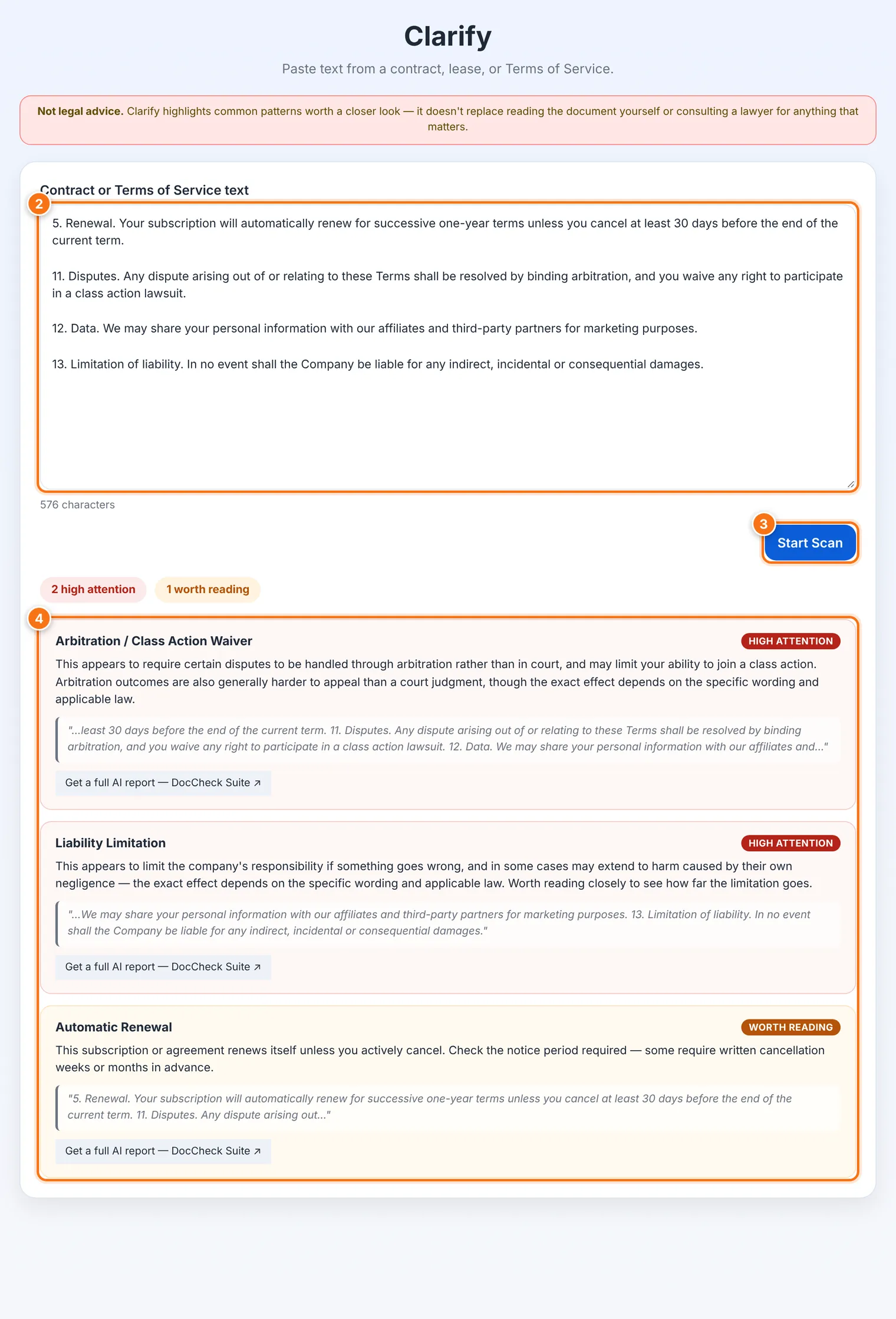
Copy the full text of the contract or terms.
Paste it into Contract or Terms of Service text.
Press Start Scan.
Read the results. Each finding quotes the wording and is marked:
| Mark | What it means |
|---|---|
| High attention | Wording that can seriously limit your rights, such as giving up the right to go to court. Read it closely. |
| Worth reading | Terms that may affect you, such as automatic renewal. |
| Good to know | Common terms worth being aware of. |
If nothing matches, Clarify says No common red-flag patterns matched. That doesn't mean the document is risk-free, only that none of its known patterns were found.
Other languages
Clarify's patterns are written for legal wording in a specific language and legal system. The English version looks for English legal wording. Language versions of the page explain which wording they can check, rather than pretending to read every language.
Going further
For a deeper report, the results offer a link to DocCheck Suite, a separate AI-powered service. Clarify itself never sends your text anywhere. Use DocCheck only if you're comfortable sharing the document with that service.
What it does not do
It won't catch everything. Legal language varies a lot, and unusual or narrowly worded clauses can slip past pattern matching.
It doesn't judge whether a term is legal where you live, or whether you should sign.
It reads text only. For a PDF or scanned document, copy the text out first.
Common problems
| Problem | What to do |
|---|---|
| Nothing was found, but I'm worried | Read the document yourself, especially sections on cancellation, payment, disputes and your data. Ask a lawyer if it matters. |
| My text is from a scanned PDF | Use a program that recognizes text (OCR) to get the words out, then paste them in. |